Start with the relationship
The question this tool answers is specific: given volume, bulk density, what value follows from the stated model? The result is expressed in kg. The calculation below makes that relationship visible, so the answer can be checked independently instead of accepted as an unexplained number.
Keep a measurement sheet separate from the purchasing allowance. Record which dimensions are internal, which openings were subtracted and which items must be bought as full packs. These are material and schedule estimates; they do not establish structural adequacy or building-code compliance.
A worked example
Use the following values as a reproducible starting point. They are illustrative inputs, not measurements of your situation or a recommendation for a particular project. The calculator opens with the same values, making it possible to compare a manual calculation with the on-screen answer.
| Input | Example value | Unit |
|---|---|---|
| Volume | 1.5 | m³ |
| Bulk density | 1,600 | kg/m³ |
Substitute these quantities into the displayed relationship: volume = 1.5 m³; bulk density = 1,600 kg/m³. Carry out the operations before rounding the final value. This gives 2,400 kg. The number is a result for this particular set of inputs; changing the measurement basis or the conditions can change its practical meaning.
What changes when an input changes?
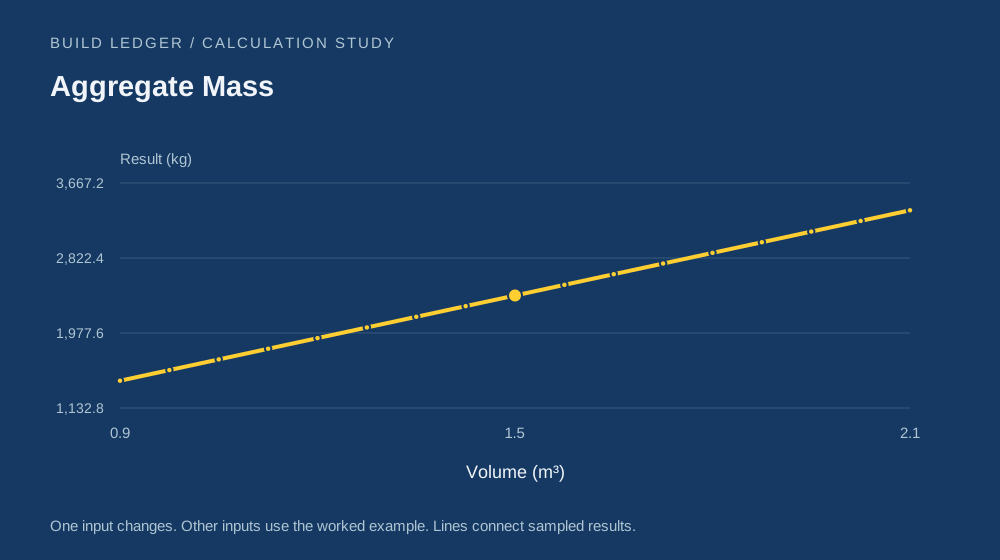
In the illustrated range, changing volume from 0.9 to 2.1 m³ moves the result from 1,440 to 3,360 kg. The output increases between those endpoints. The table gives intermediate samples so you can see whether the response is smooth, stepped or nonmonotonic; the endpoints alone do not establish that behaviour.
Every other input keeps the value shown in the example table. This controlled comparison isolates one relationship at a time. For a real decision, try a lower, central and higher plausible input instead of treating an uncertain measurement as perfectly exact.
| Volume (m³) | Result (kg) |
|---|---|
| 0.9 | 1,440 |
| 1.2 | 1,920 |
| 1.5 | 2,400 |
| 1.8 | 2,880 |
| 2.1 | 3,360 |
The assumption that matters
Density varies with aggregate type, grading and moisture; the default is not a specification.
A valid numerical result only means the entered values can be evaluated by this formula. It does not confirm that the formula describes every feature of the real situation. Read the unit labels, check the measurement method and keep the specific limitation above with the result when sharing it.
Use the result in your own work
Open the calculator, replace the example values and select Calculate. The result is evaluated on your device. Reset example restores this article's scenario, while Copy result keeps the quantity and unit together. If an input is outside the model's allowed range, correct it before interpreting the output.
Keep more digits during a chain of calculations than you show in a finished note. Displayed values are rounded for readability; extra decimals do not make a rough measurement more accurate. When your decision depends on a tight tolerance, compare the original measurements and assumptions before relying on the last displayed digit.
Further reading & method notes
NIST — units, prefixes and measurement conventions provides background for this subject. This article's numerical examples and chart were calculated from the formula shown above. See the editorial policy for how this collection presents assumptions and corrections.